# User interactions

##### Notification: 

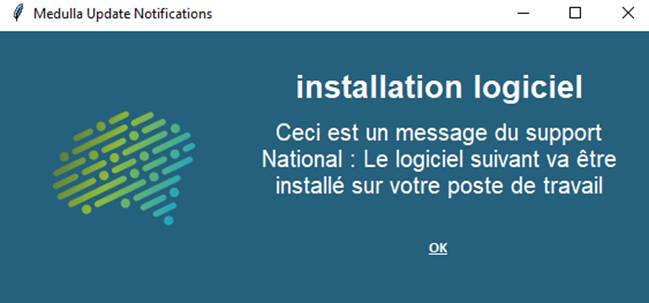
<span style="font-size:10pt;">Notify the user </span>

<span style="font-size:10pt;">Drag the "**User notification**" action into the deployment workflow on the right</span>

<span style="font-size:10pt;font-family:Symbol;"><span>· </span></span><span style="font-size:10pt;"> Enter the Title</span>

<span style="font-size:10pt;font-family:Symbol;"><span>· </span></span><span style="font-size:10pt;"> Enter the desired message </span>

<span style="font-size:10pt;font-family:Symbol;"><span>· </span></span><span style="font-size:10pt;"> Specify the display duration in seconds</span>

<span style="font-size:10pt;"> </span>

<span>![Une image contenant texte, capture d’écran, Police, conception  Description générée automatiquement](https://docs.medulla-tech.io/uploads/images/gallery/2025-12/uYWlts0ASVK549sq-embedded-image-blb7pjy4.png)</span>

<span style="font-size:10pt;"> </span>

##### User question:

<span style="font-size:10pt;"> </span>

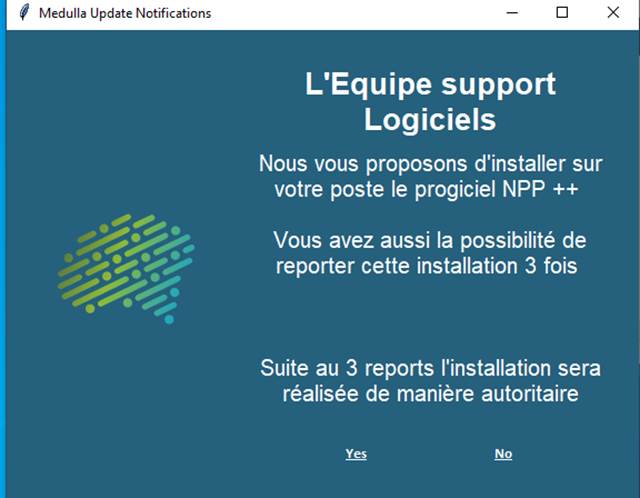
<span style="font-size:10pt;">Drag the "**User Question** " action into the deployment workflow on the right</span>

<span style="font-size:10pt;"> </span><span style="font-size:10pt;">The user can interact with the deployment, depending on the selected options</span>

<span style="font-size:10pt;"> </span>

<span style="font-size:10pt;">In this action, depending on the user’s response, the following actions are possible:</span>

<span style="font-size:10pt;"><span>1. </span></span><span style="font-size:10pt;"> If “True” go to step: If the user answers the question in the affirmative</span>

<span style="font-size:10pt;"><span>2. </span></span><span style="font-size:10pt;"> If “False” go to step: If the user answers the question in the negative</span>

<span style="font-size:10pt;"><span>3. </span></span><span style="font-size:10pt;"> If “No User” go to step: If no user is logged in to the machine</span>

<span style="font-size:10pt;"><span>4. </span></span><span style="font-size:10pt;"> If “Timeout” go to step: If the user does not respond within the allotted time (in the example above: 300 seconds) 5 min</span>

<span style="font-size:10pt;">To define the **“GO TO STEP”**steps, additional actions are required in the**“Deployment Flow**.” </span>
<span style="font-size:10pt;"> </span>

<span>![Une image contenant texte, capture d’écran, Police  Description générée automatiquement](https://docs.medulla-tech.io/uploads/images/gallery/2025-12/QksGFY5U5oDwKtG2-embedded-image-pl6xcla7.png)</span>

<span style="font-size:10pt;"> </span>

<span style="font-size:10pt;">The actions placed behind the Yes and No buttons must be executed correctly.</span>

<span style="font-size:10pt;">Responses to questions must be displayed in the deployment logs</span>

<span style="font-size:10pt;">The timeout value must be observed.   
</span>

#### User Postpone Option:

<span style="font-size:10pt;"> </span>

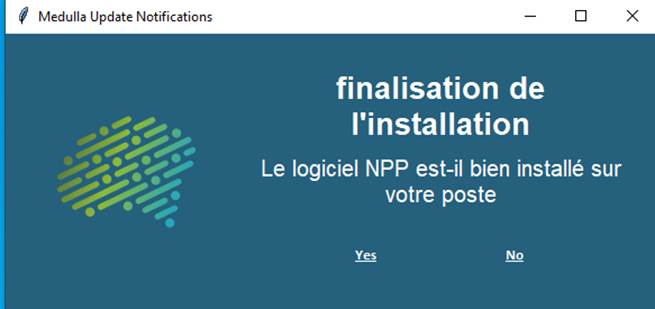
<span style="font-size:10pt;">This action allows the window to be displayed multiple times if the "False" button is selected.</span>

<span style="font-size:10pt;"> </span>

<span style="font-size:10pt;">The user is asked whether to proceed with the deployment, and additional actions are required in the "Deployment Flow" section. </span>

<span style="font-size:10pt;">Here, there are two additional options corresponding to the number of times the user can postpone the deployment (accessible by clicking the Options button), as well as an option specifying the action to take if the maximum number of postponements is reached: “If ‘Max Postponements Reached’ go to step.”</span>

<span style="font-size:10pt;"> </span>

<span style="font-size:10pt;">Drag the **“User Postpone Option”** action into the deployment workflow on the right</span>

<span style="font-size:10pt;font-family:Symbol;"><span>· </span></span><span style="font-size:10pt;"> Enter the Title</span>

<span style="font-size:10pt;font-family:Symbol;"><span>· </span></span><span style="font-size:10pt;"> Enter the desired message </span>

<span style="font-size:10pt;font-family:Symbol;"><span>· </span></span><span style="font-size:10pt;"> Specify the display time in seconds:</span>

<span style="font-size:10pt;font-family:'Courier New';"><span>o </span></span><span style="font-size:10pt;"> e</span>.g<span style="font-size:10pt;">., 300 sec, 5 min</span>

<span style="font-size:10pt;font-family:Symbol;"><span>· </span></span><span style="font-size:10pt;"> The number of possible reminders</span>

<span style="font-size:10pt;font-family:'Courier New';"><span>o </span></span><span style="font-size:10pt;"> e</span>.g<span style="font-size:10pt;">., 3</span>

<span style="font-size:10pt;font-family:Symbol;"><span>· </span></span><span style="font-size:10pt;"> The time interval between each refresh:</span>

<span style="font-size:10pt;font-family:'Courier New';"><span>o </span></span><span style="font-size:10pt;"> e.g., 900 sec, 15 min</span>

<span style="font-size:10pt;font-family:Symbol;"><span>· </span></span><span style="font-size:10pt;"> The actions defined for each choice</span>

<span style="font-size:10pt;"> </span>

<span>![Une image contenant texte, capture d’écran, Police, logiciel  Description générée automatiquement](https://docs.medulla-tech.io/uploads/images/gallery/2025-12/2qxV1iUb6dUOfUhz-embedded-image-ksnqsyur.png)</span>

<span>  
</span>

<span style="font-size:10pt;">The actions associated with the **Yes** and **No** buttons must be executed correctly.</span>

<span style="font-size:10pt;">The specified time between each retry of the questions must be observed</span>

<span style="font-size:10pt;">Responses to the questions must be displayed in the deployment logs</span>

<span style="font-size:10pt;font-family:Arial, sans-serif;">The timeout value must be observed. </span>