# Interacciones de los usuarios

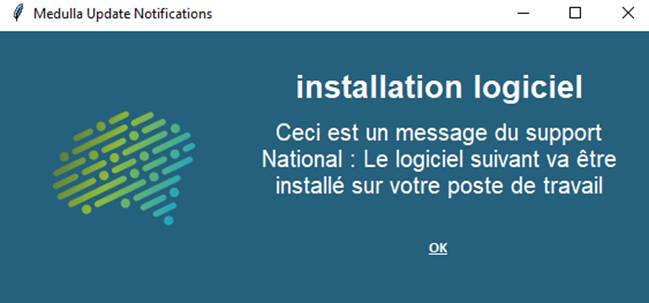
##### Notificación: 

<span style="font-size:10pt;">Informar al usuario </span>

<span style="font-size:10pt;">Arrastra la acción «**Notificación al usuario**» al flujo de trabajo de implementación de la derecha</span>

<span style="font-size:10pt;font-family:Symbol;"><span>· </span></span><span style="font-size:10pt;"> Rellene el título</span>

<span style="font-size:10pt;font-family:Symbol;"><span>· </span></span><span style="font-size:10pt;"> Indique el mensaje deseado </span>

<span style="font-size:10pt;font-family:Symbol;"><span>· </span></span><span style="font-size:10pt;"> Especificar el tiempo de visualización en segundos</span>

<span style="font-size:10pt;"> </span>

<span>![Une image contenant texte, capture d’écran, Police, conception  Description générée automatiquement](https://docs.medulla-tech.io/uploads/images/gallery/2025-12/uYWlts0ASVK549sq-embedded-image-blb7pjy4.png)</span>

<span style="font-size:10pt;"> </span>

##### Pregunta del usuario:

<span style="font-size:10pt;"> </span>

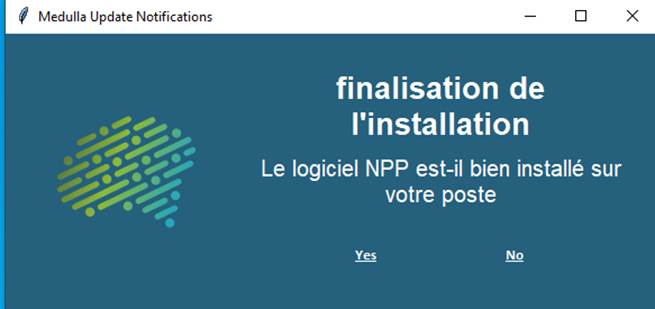
<span style="font-size:10pt;">Arrastrar la acción «**User Question** » al flujo de trabajo de implementación de la derecha</span>

<span style="font-size:10pt;"> </span><span style="font-size:10pt;">El usuario puede interactuar con la implementación, según las opciones seleccionadas</span>

<span style="font-size:10pt;"> </span>

<span style="font-size:10pt;">En esta acción, dependiendo de la respuesta del usuario, se pueden realizar las siguientes acciones:</span>

<span style="font-size:10pt;"><span>1. </span></span><span style="font-size:10pt;"> If “True” go to step: Si el usuario responde afirmativamente a la pregunta</span>

<span style="font-size:10pt;"><span>2. </span></span><span style="font-size:10pt;"> Si «Falso», ir al paso: Si el usuario responde negativamente a la pregunta</span>

<span style="font-size:10pt;"><span>3. </span></span><span style="font-size:10pt;"> Si «No hay usuario», ir al paso: Si no hay ningún usuario conectado al equipo</span>

<span style="font-size:10pt;"><span>4. </span></span><span style="font-size:10pt;"> Si «Timeout», ir al paso: Si el usuario no responde en el tiempo establecido (en el ejemplo anterior: 300 segundos) 5 min</span>

<span style="font-size:10pt;">Para definir los pasos **«GO TO STEP**», es necesario tener otras acciones en el «**Flujo de implementación**». </span>
<span style="font-size:10pt;"> </span>

<span>![Une image contenant texte, capture d’écran, Police  Description générée automatiquement](https://docs.medulla-tech.io/uploads/images/gallery/2025-12/QksGFY5U5oDwKtG2-embedded-image-pl6xcla7.png)</span>

<span style="font-size:10pt;"> </span>

<span style="font-size:10pt;">Las acciones situadas detrás de los botones «Sí» y «No» deben ejecutarse correctamente.</span>

<span style="font-size:10pt;">Las respuestas a las preguntas deben aparecer en los registros de la implementación</span>

<span style="font-size:10pt;">Se debe respetar el valor de tiempo de espera.   
</span>

#### Opción de aplazamiento del usuario:

<span style="font-size:10pt;"> </span>

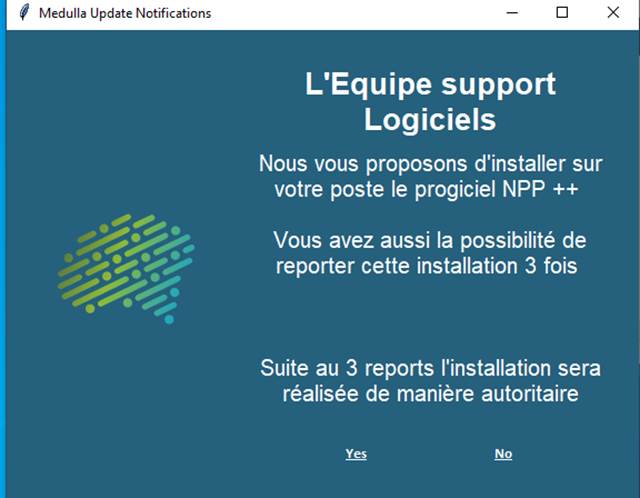
<span style="font-size:10pt;">Esta acción permite que la ventana se vuelva a mostrar varias veces si se selecciona el botón «False».</span>

<span style="font-size:10pt;"> </span>

<span style="font-size:10pt;">Se le pregunta al usuario si desea realizar la implementación o no, y se requieren otras acciones en la sección «Flujo de implementación». </span>

<span style="font-size:10pt;">Aquí hay dos opciones más que corresponden al número de veces que el usuario puede posponer la implementación (accesibles haciendo clic en el botón Opciones), pero también una opción que corresponde a la acción que se debe realizar si se alcanza el número de respuestas negativas: «Si se alcanza el número máximo de aplazamientos, ir al paso».</span>

<span style="font-size:10pt;"> </span>

<span style="font-size:10pt;">Arrastra la acción **«User Postpone Option»** al flujo de trabajo de implementación de la derecha</span>

<span style="font-size:10pt;font-family:Symbol;"><span>· </span></span><span style="font-size:10pt;"> Introduzca el título</span>

<span style="font-size:10pt;font-family:Symbol;"><span>· </span></span><span style="font-size:10pt;"> Indique el mensaje deseado </span>

<span style="font-size:10pt;font-family:Symbol;"><span>· </span></span><span style="font-size:10pt;"> Especificar el tiempo de visualización en segundos:</span>

<span style="font-size:10pt;font-family:'Courier New';"><span>o </span></span><span style="font-size:10pt;"> p. ej., 300 s, 5 min</span>

<span style="font-size:10pt;font-family:Symbol;"><span>· </span></span><span style="font-size:10pt;"> El número de reintentos posibles</span>

<span style="font-size:10pt;font-family:'Courier New';"><span>o </span></span><span style="font-size:10pt;"> Ej.: 3</span>

<span style="font-size:10pt;font-family:Symbol;"><span>· </span></span><span style="font-size:10pt;"> El intervalo de tiempo entre cada repetición:</span>

<span style="font-size:10pt;font-family:'Courier New';"><span>o </span></span><span style="font-size:10pt;"> Ej.: 900 s, 15 min</span>

<span style="font-size:10pt;font-family:Symbol;"><span>· </span></span><span style="font-size:10pt;"> Las acciones definidas para cada opción</span>

<span style="font-size:10pt;"> </span>

<span>![Une image contenant texte, capture d’écran, Police, logiciel  Description générée automatiquement](https://docs.medulla-tech.io/uploads/images/gallery/2025-12/2qxV1iUb6dUOfUhz-embedded-image-ksnqsyur.png)</span>

<span>  
</span>

<span style="font-size:10pt;">Las acciones asociadas a los botones **«Sí** » y **«No»** deben ejecutarse correctamente.</span>

<span style="font-size:10pt;">Se debe respetar el tiempo especificado entre cada repetición de las preguntas</span>

<span style="font-size:10pt;">Las respuestas a las preguntas deben mostrarse en los registros de la implementación</span>

<span style="font-size:10pt;font-family:Arial, sans-serif;">Se debe respetar el valor de tiempo de espera. </span>