# Remote Access Verification
##### Workflow
[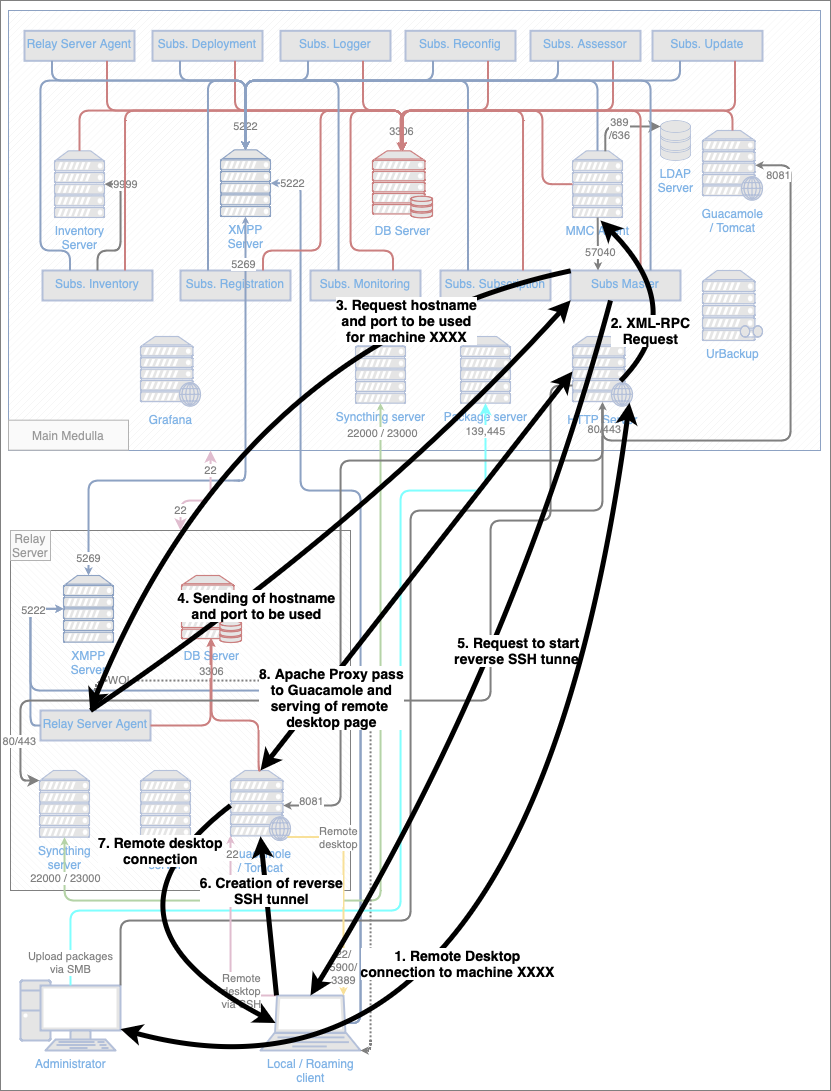](https://docs.medulla-tech.io/uploads/images/gallery/2026-01/eKNn3kxRPTvWSJ3E-workflow-remote-desktop.png)
# Logs
- /var/log/apache2/\*.log
- /var/log/mmc/mmc-agent.log
- /var/log/pulse/xmpp-agent-relay.log
- /var/log/mmc/master-mast.log
- C:\\Program Files\\Medulla\\var\\log\\xmpp-agent-machine.log
- /var/log/tomcat9/\*.log
- /var/log/tomcat9/\*.txt
- journalctl -u guacd -f
# Debugging operations
- List the Guacamole connections recorded for a machine:
```
USE xmppmaster;
SELECT jid,
hostname,
machine_id,
idguacamole,
protocol
FROM machines
JOIN has_guacamole
ON machines.id = has_guacamole.machine_id
WHERE jid like '%machine_name%';
```
If the connection does not exist, re-register the machine
If there is still no connection after re-registration, verify that the protocols are enabled on the machine (VNC running, RDP enabled, OpenSSH daemon running).
- Display connection details (performed on the machine's relay)
```
USE guacamole;
SELECT guacamole_connection.protocol as protocol,
guacamole_connection.connection_id as connection_id,
parameter_name,
parameter_value
FROM guacamole_connection_parameter
JOIN guacamole_connection
ON guacamole_connection_parameter.connection_id = guacamole_connection.connection_id
where guacamole_connection.connection_id = 6084964;
```
```
+----------+---------------+-----------------+-----------------+
| protocol | connection_id | parameter_name | parameter_value |
+----------+---------------+-----------------+-----------------+
| vnc | 6084964 | color-depth | 24 |
| vnc | 6084964 | hostname | localhost |
| vnc | 6084964 | listen-timeout | 50000 |
| vnc | 6084964 | port | 47749 |
| vnc | 6084964 | reverse-connect | true |
+----------+---------------+-----------------+-----------------+
```
- Verifying the reverse connection
If a reverse connection is established (hostname = localhost), verify the connection by running
```
netstat -vatpn | grep
```
If no lines are displayed, you will need to debug the reverse SSH
[SUPPORT - Reverse SSH - Support](https://3.basecamp.com/4759565/buckets/18059611/messages/9187346291)
- VNC Debugging
On the client machine, verify that the VNC server is listening:
```
netstat -an | find "5500"
```
If this is not the case, check that TightVNC is running
On the client machine, verify that reverse SSH is set up correctly:
```
netstat | find "ssh"
```
On the relay, verify that reverse SSH is properly established:
```
netstat -vatpn | grep sshd
```
Note that the reverse connection is established on a random port.
The GUACD port on the server is then redirected to port 5500 in the tunnel. This redirection occurs when the reverse connection is established.
See the reverse SSH debug section above
On the relay, verify that guacd is listening on the port specified by the guacamole settings (here 54775):
```
netstat -vatpn |grep guacd
```