Chapter 3: Main Interface
The dashboard
Dashboard Overview The Medulla dashboard provides a clear and detailed overview of the status of your IT infrastructure. Designed to give you a quick and accurate snapshot, it consolidates essential information and performance metrics to help you make informed decisions in real time.
Fully customizable, this dashboard allows you to tailor its content to your priorities by adding or removing widgets as needed.
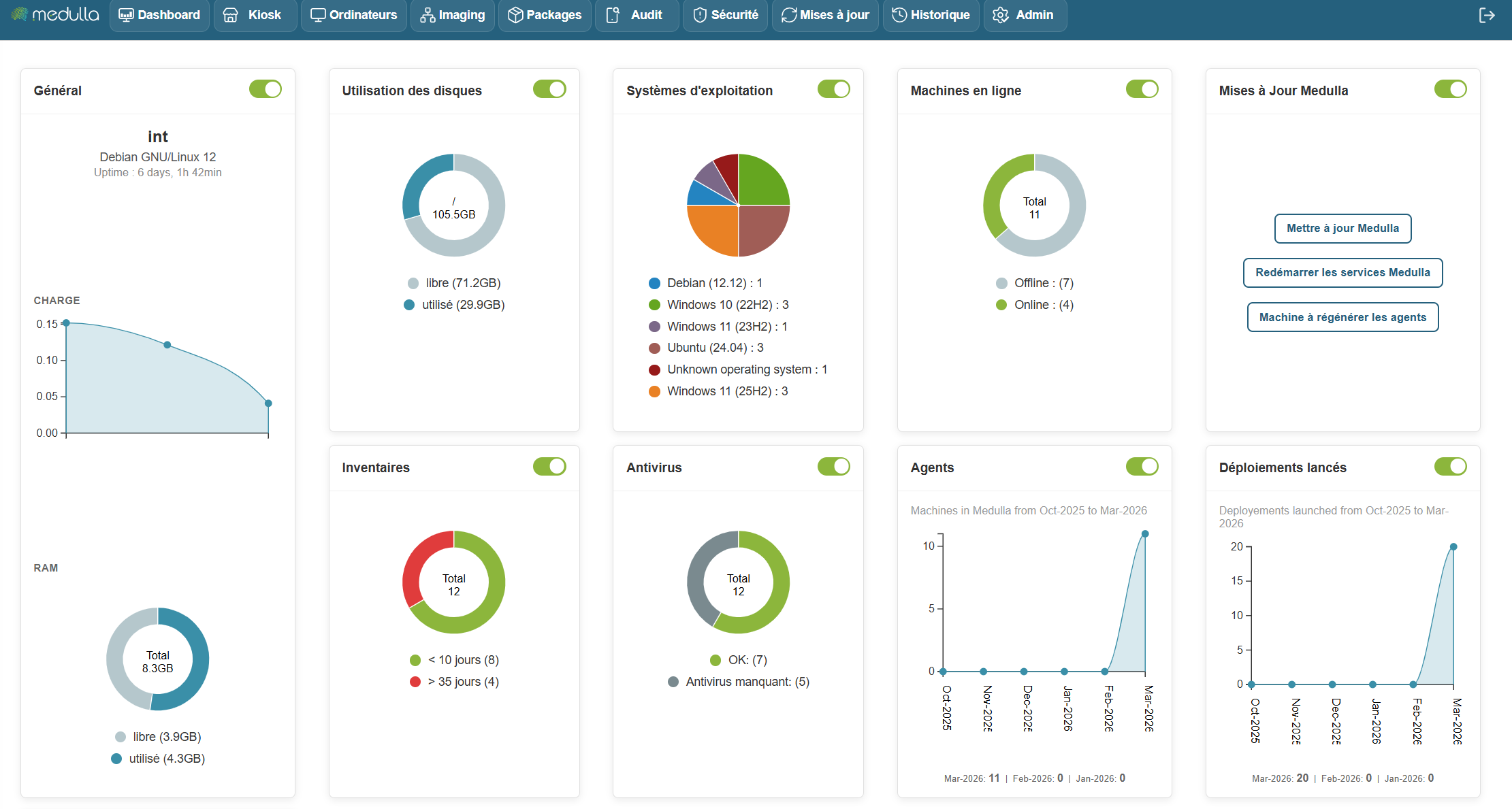
Machine Status
The dashboard displays the status of machines in real time, whether they are online, offline, or experiencing specific issues such as failed deployments or non-compliance.
Recent Alerts
It allows you to view critical and non-critical alerts, such as:
- Deployment issues
- Pending updates
- Unreachable machines
- Failed backups
Each alert can be viewed and managed directly from this section.
History of actions and events
Detailed tracking of actions performed on the system, including:
- Completed deployments
- Backups performed
- Configuration changes
- Remote access
Update tracking
The dashboard lets you track the status of ongoing updates, with the ability to easily manage them: install immediately or schedule for later.
Resource management
You have direct access to system resource usage, such as:
- Bandwidth
- Available storage space
- Management server performance
Dashboard Customization
Thanks to widget customization, you can track key information such as:
- The number of machines working remotely
- Device compliance
- Deployment progress
Widgets can be easily rearranged using drag-and-drop, providing an experience fully tailored to your needs.
Dashboard interactivity
The dashboard is interactive, allowing you to:
- Click on an alert to view details and respond directly.
- Click on a machine to access its information and perform actions, such as deploying software.
- Click on an update to install it immediately or schedule it according to your schedule.
Benefits
- A quick and responsive overview of incidents, allowing you to react immediately.
- Direct access to critical actions, without having to navigate through complex menus.
- Save time with centralized management and constantly updated information.
To learn more or access advanced features, you can view the additional documentation by clickingDashboard.
For more information, visit our website: https://medulla-tech.io
Menu and navigation
Overview: Medulla’s interface is designed to provide a smooth, clear, and functional user experience. Thanks to its modular structure, each user can quickly access the information and actions they need.

Main Navigation Bar
Located at the top of the screen, the navigation bar gives you access to the platform’s main modules

Custom Dashboard
Users can configure a personalized dashboard with dynamic widgets:
- Number of active machines
- Deployments in progress
- Recent backups
- Critical alerts

For more information, visit our website:www.medulla.fr
Interface layout
A modular and intuitive interface Medulla is built on a modular interface, where each feature is grouped by theme into an independent module. This allows for:
-
Simplify daily use
-
Quickly navigate to the desired action
-
Adapt the tool to your business needs
Each module functions as an application within the application, with its own views, filters, tabs, and settings.
Example of module-based organization
Let’s look at a few concrete examples:
Computers Module

Main view:
List of computers with status (online/offline), user, and last contact.
Available tabs:
Inventory, Actions, PMAD, Backup, History.
Available filters:
Operating system, groups, connectivity.
Additional features:
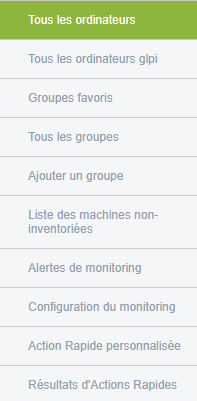
- All computers / GLPI
- Favorite groups
- Uninventoried machines
- Alert monitoring, configuration
- Quick actions (custom and results)
- XMPP view
Search:
By fields, entity, with filtering options.
Example of a listed machine:

To learn more or access advanced features, you can consult the additional documentation by clicking Computers