Interface layout
A modular and intuitive interface Medulla is built on a modular interface, where each feature is grouped by theme into an independent module. This allows for:
-
Simplify daily use
-
Quickly navigate to the desired action
-
Adapt the tool to your business needs
Each module functions as an application within the application, with its own views, filters, tabs, and settings.
Example of module-based organization
Let’s look at a few concrete examples:
Computers Module

Main view:
List of computers with status (online/offline), user, and last contact.
Available tabs:
Inventory, Actions, PMAD, Backup, History.
Available filters:
Operating system, groups, connectivity.
Additional features:
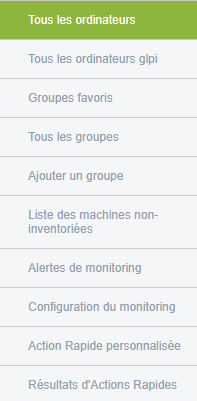
- All computers / GLPI
- Favorite groups
- Uninventoried machines
- Alert monitoring, configuration
- Quick actions (custom and results)
- XMPP view
Search:
By fields, entity, with filtering options.
Example of a listed machine:

To learn more or access advanced features, you can consult the additional documentation by clicking Computers
