
Organisation of the interface
A modular and intuitive medulla interface is based on a modular interface, where each feature is grouped by theme into an independent module. This allows:
Simplify daily use
Navigate quickly to the desired action
Adapt the tool to your business need
Each module works as an application in the application, with its own views, filters, tabs, and settings.
Example of organization by module
Here are some concrete examples:
Computer Module

Main display:
List of computers with status (online/offline), user, last contact.
Tabs available:
Inventory, Actions, LDCD, Backup, History.
Filters for use:
Operating system, groups, connectivity.
Additional Features: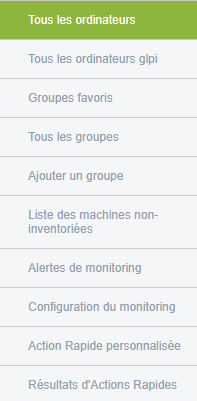
- All computers / GLPI
- Favorite groups
- Non-inventory machines
- Monitoring alerts, configuration
- Rapid actions (personalised and results)
- XMPP view
Research:
By fields, entity, with deletion options.
Example of machine listed:

To learn more or access advanced features, you can view the additional documentation by clicking Computers
