
Fix the error “Your account has no reference entities”
Applies to: Medulla Server with GLPI
Version: All versions
Environment: On-Premise only
Category: Administration / GLPI / Entities Management
Issue encountered
In Medulla, when accessing the Admin > Entities Management menu, the list of entities does not appear.
The following message appears:
Your account with profile [Super-Admin] has no reference entities.
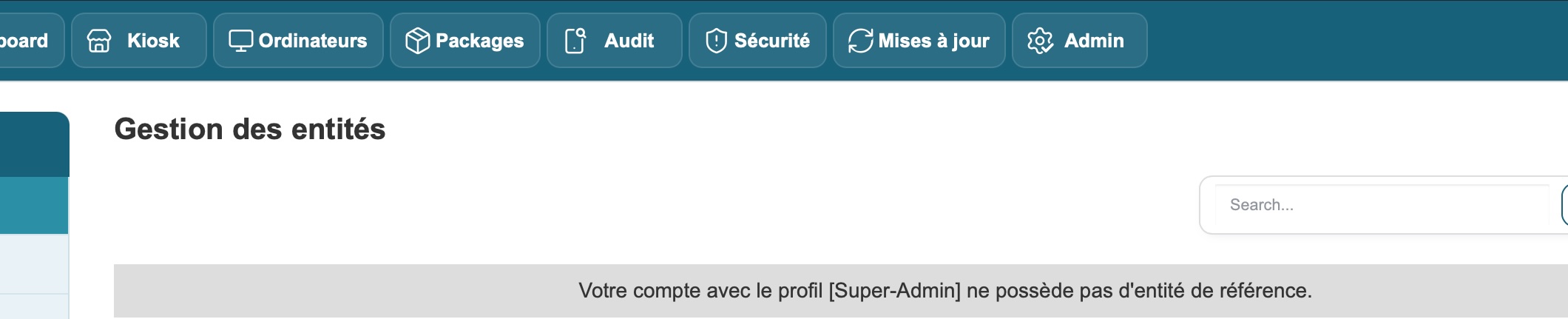
This error may be caused by a permissions issue with the GLPI cache files, preventing Medulla from correctly retrieving entity information.
1. Identify the cause in the GLPI logs
On the Medulla server hosting GLPI, log in with an account that has administrator privileges.
Check the following GLPI logs:
/var/lib/glpi/files/_log/php-errors.log: PHP errors and file access issues./var/lib/glpi/files/_log/sql-errors.log: errors related to SQL queries.
To view the latest errors:
tail -n 100 /var/lib/glpi/files/_log/php-errors.log

tail -n 100 /var/lib/glpi/files/_log/sql-errors.log
To search specifically for permission errors:
grep -i "Permission denied" /var/lib/glpi/files/_log/php-errors.log | tail -20Example of an error encountered
The following error was observed in the php-errors.log file:
[2026-10-16 20:23:32] glpiphplog.WARNING:
Failed to save key "{key}" of type array:
fopen(/var/lib/glpi/files/_cache/core/bea52abca74a):
Failed to open stream: Permission denied
The error originates from the Symfony cache management component used by GLPI:
Symfony\Component\Cache\Adapter\FilesystemAdapter

/usr/share/glpi/vendor/symfony/cache/Traits/FilesystemCommonTrait.php:100
The Permission denied message indicates that GLPI is unable to write to its cache directory.
Identified cause:
The web server does not have the necessary permissions to write to the /var/lib/glpi/files/_cache/ directory or to certain files within it.
This issue can disrupt GLPI’s operation and cause errors in the Medulla interface, particularly when displaying entities.
2. Check the GLPI cache permissions
Check the directory’s owner and group:
ls -ld /var/lib/glpi/files/_cacheAlso check the permissions of the subdirectory affected by the error:
ls -ld /var/lib/glpi/files/_cache/coreOn a Medulla installation that uses the www-data account to run GLPI, this account must have the necessary permissions to access the cache and write to it.
3. Correct the permissions
If the logs confirm a permissions issue and GLPI is using the www-data account, run the following command with administrator privileges:
chown -R www-data:www-data /var/lib/glpi/files/_cacheThis command recursively assigns ownership of the GLPI cache directory and its contents to the www-data user and group.
Caution:
The command must be applied only to the /var/lib/glpi/files/_cache directory.
It is not necessary to change the permissions of the entire /var/lib/glpi/ directory.
4. Verify the change
Check the permissions after making the changes:
ls -ld /var/lib/glpi/files/_cache
ls -ld /var/lib/glpi/files/_cache/core
The owner and group must be:
www-data www-dataThen return to the Medulla interface:
- Refresh the page.
- Go to the Admin > Entities Management menu.
- Verify that the list of entities displays correctly.
- Verify that the message regarding the absence of a reference entity has disappeared.
Expected result:
When the error was caused by GLPI cache permissions, this fix restores access to the cache and may resolve the issue with displaying entities in Medulla.
5. If the problem persists
If the message remains displayed after the fix, check the GLPI logs again:
tail -n 100 /var/lib/glpi/files/_log/php-errors.log

tail -n 100 /var/lib/glpi/files/_log/sql-errors.log
Check in particular for:
- that there are no new
Permission deniederrors in the GLPI cache; - that there are no SQL errors preventing the retrieval of entities;
- that the Super-Admin profile is present on the affected account;
- that a reference entity is actually associated with the user account in GLPI.
Note:
The message indicating that a user does not have a reference entity can have several causes. The cache fix is particularly relevant when the GLPI logs report write errors in /var/lib/glpi/files/_cache/.
Summary of commands
| Action | Command |
|---|---|
| View PHP errors | tail -n 100 /var/lib/glpi/files/_log/php-errors.log |
| View SQL errors | tail -n 100 /var/lib/glpi/files/_log/sql-errors.log |
| Search for permission errors | grep -i "Permission denied" /var/lib/glpi/files/_log/php-errors.log | tail -20 |
| Check cache permissions | ls -ld /var/lib/glpi/files/_cache |
| Fix permissions | chown -R www-data:www-data /var/lib/glpi/files/_cache |
Quick fix:
If the message “Your account with profile [Super-Admin] has no reference entities” appears in Medulla and the GLPI logs show a Permission denied error in the cache, correct the permissions using:
chown -R www-data:www-data /var/lib/glpi/files/_cacheThen refresh the Admin > Entities Management page to verify that the issue has been resolved.