
PMAD – Diagnose the HTTP Referer used by Guacamole
Applies to: Medulla
Version: All versions
Environment: On-Premise / SaaS
Category: Remote control (PMAD) / Guacamole
If remote control (PMAD) via Guacamole does not work or if the remote connection fails, one of the first things to check is the HTTP Referer header sent with the request.
Guacamole uses this information to verify that the request is coming from an authorized Medulla URL.
Important:
A discrepancy between the URL used to access Medulla, the Referer sent by the browser, and the authorized configuration on the Guacamole side can prevent the remote control from working.
1. Check the Referer from the browser
This check can be performed on both Medulla On-Premise and Medulla SaaS platforms.
In Google Chrome, open Medulla using the URL you normally use, then open the Developer Tools.
You can open them using:
F12or, depending on your system, using the shortcut to open Chrome’s Developer Tools.
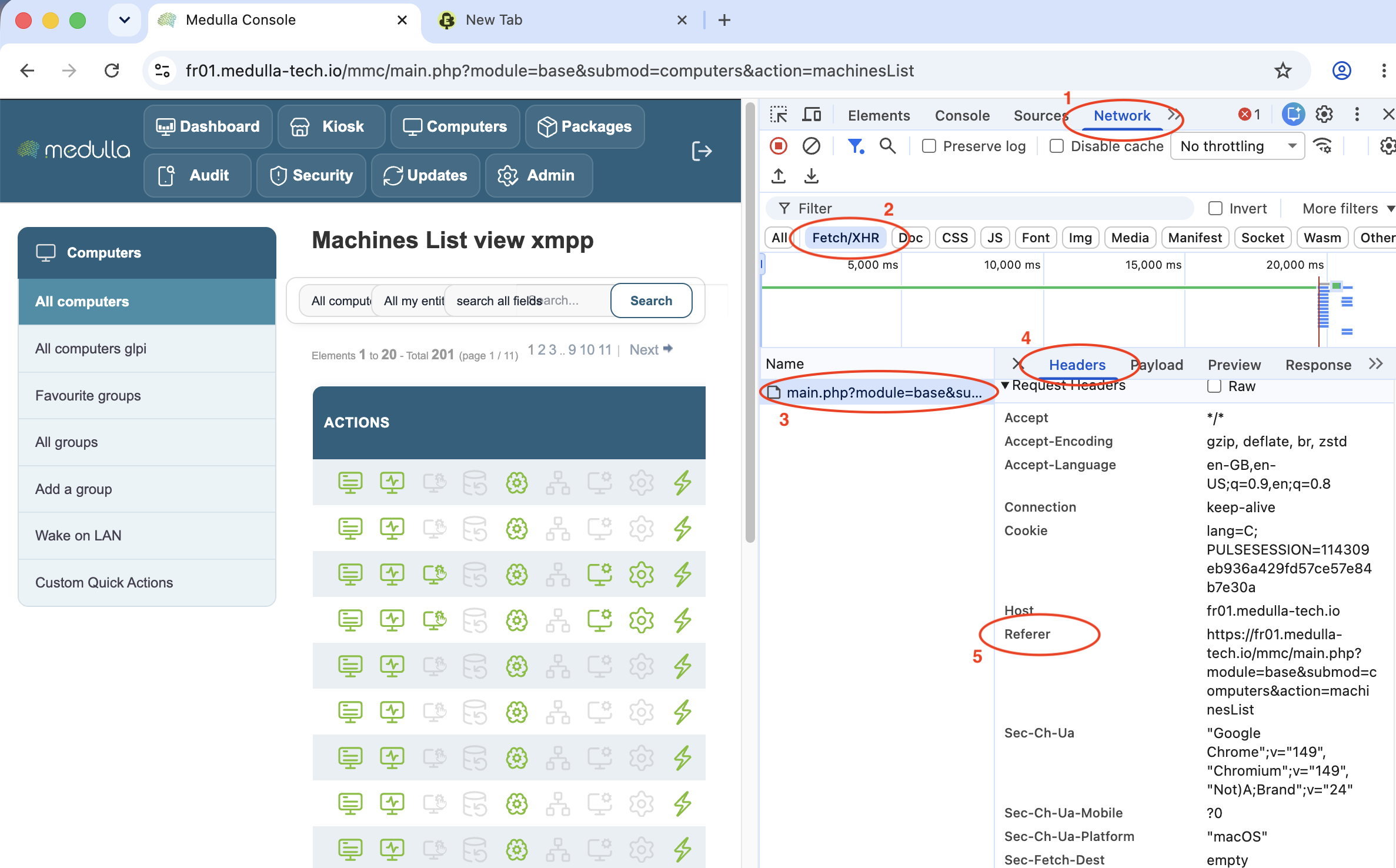
Procedure
- Open Chrome’s Developer Tools.
- Select the Network tab.
- Select the Fetch/XHR filter.
- Perform an action in Medulla to generate a request.
- Select a
main.php?...request from the list. - Open the Headers tab.
- In the Request Headers section, look for the Referer line.
You should see a value that matches the URL actually used to access Medulla.
For example:
Referer: https://medulla.exemple.fr/mmc/main.php?...The domain in the Referer must therefore match the FQDN used by the user to access Medulla.
Example:
If the user accesses Medulla via https://medulla.exemple.fr, the Referer must also begin with https://medulla.exemple.fr/.
2. The Referer is missing or incorrect
If the Referer field is missing, contains a different FQDN, or does not match the actual URL used to access Medulla, remote control may not work.
In this case, you must determine at what point the Referer is removed or modified.
In particular, check:
- the URL actually used to access Medulla;
- the FQDN in the
Referer; - whether a reverse proxy is present;
- whether a load balancer is present;
- whether there is a proxy or intermediate device that could modify HTTP headers.
3. Medulla On-Premise platform
On a Medulla On-Premise platform, if the Referer sent by the browser is correct but PMAD still isn’t working, check the Apache configuration used by Guacamole.
On the Medulla server, check the following files:
/etc/apache2/conf-enabled/guacamole*.confLook for directives containing:
SetEnvIf Referer "^https?://<fqdn_in_use>/" GUACAMOLE_ALLOWEDThe specified FQDN must match the URL actually used by users to access Medulla.
Example
If Medulla is accessible via:
https://medulla.exemple.frthe configuration must use:
SetEnvIf Referer "^https?://medulla\.exemple\.fr/" GUACAMOLE_ALLOWEDImportant:
This directive appears twice in each of the relevant files. Check and, if necessary, correct both instances.
4. Verify the Apache configuration
After modifying the configuration, check the Apache syntax before reloading the service:
apache2ctl configtestThe expected result is:
Syntax OKIf the configuration is valid, reload Apache:
systemctl reload apache2Caution:
Do not reload Apache if apache2ctl configtest reports an error. Correct the configuration first.
5. Reverse proxy scenario
If Medulla is hosted behind a reverse proxy, verify that the reverse proxy preserves and correctly passes through the HTTP header:
RefererThe reverse proxy must not remove or replace this header with a value that is incompatible with the URL used to access Medulla.
Guacamole uses the Referer header to verify that the request originates from an authorized Medulla URL.
If the reverse proxy removes or modifies this information, the PMAD may be rejected even if Guacamole and Medulla are functioning correctly.
Tip:
Compare the Referer value shown in Chrome’s Developer Tools with the FQDN expected by your infrastructure. This check allows you to quickly identify a URL discrepancy or an issue related to an intermediate device.
6. Case of a Medulla SaaS platform
On a Medulla SaaS platform, verifying the Referer from the browser still applies.
If the remote control is not working, note the following in particular:
- the URL used to access Medulla;
- the full value of the
Refererfield visible in Chrome; - the behavior observed when launching the PMAD;
- any error message that may have been displayed.
This information can be sent to Medulla support to facilitate troubleshooting.
Note:
On a SaaS platform, changes to the Apache and Guacamole configurations are managed by the Medulla infrastructure. Therefore, it is not necessary to perform the configuration changes described in the On-Premise section.
7. Retest the remote control
After verification or correction:
- log back into the Medulla interface;
- select an online computer;
- start a new remote control session;
- verify that the Guacamole interface opens correctly.
8. Things to check
If the problem persists, check the following items first:
- the actual URL used to access Medulla;
- whether the
Refererfield is present in the browser requests; - the FQDN present in the
Referer; - whether a reverse proxy or a device that modifies HTTP headers is present;
- on an On-Premise installation, the FQDN configured in
guacamole*.conf; - on an On-Premise installation, the two instances of
SetEnvIf Refererin each of the relevant files; - on an On-Premise installation, the validity of the Apache configuration using
apache2ctl configtest; - on an On-Premise installation, reloading Apache after making changes.
9. Diagnostic summary
| Check | On-Premise | SaaS |
|---|---|---|
| Check the Referer in Chrome | Yes | Yes |
| Network → Fetch/XHR → Headers | Yes | Yes |
| Check the Referer's FQDN | Yes | Yes |
| Check for a possible reverse proxy | Depending on the architecture | Depending on the architecture |
Check /etc/apache2/conf-enabled/guacamole*.conf |
Yes | No |
Correct SetEnvIf Referer |
If necessary | Managed by Medulla |
Run apache2ctl configtest |
After making changes | No |
| Reload Apache | After modification | No |
Key takeaway:
If the PMAD fails via Guacamole, start by checking the value of the Referer field in Chrome → Developer Tools → Network → Fetch/XHR → Headers. The FQDN sent must match the URL used to access Medulla. On an On-Premise platform, then verify that this FQDN also matches the one authorized in the Apache Guacamole configuration.