
Test the network flows of a Medulla installation
Applies to: Medulla - Medulla relay - Medulla DMZ relay - Medulla Agent
Version: All
Environment: On-Premise
Category: Medulla
Before installing Medulla, it is essential to verify communication between:
- Your Medulla server,
- Your relay (if applicable),
- Your client computers.
To do this, we provide a testing procedure that includes dedicated scripts. All flows must pass successfully to ensure a smooth deployment and optimal operation of Medulla.
Please feel free to contact us for any assistance or clarification regarding these tests.
The scripts are available for download here:
https://dl.medulla-tech.io/nc/windows_connection_check_signed.ps1
https://dl.medulla-tech.io/nc/check_connection_ldap.sh
https://dl.medulla-tech.io/nc/check_connection_glpi.sh
(right-click on the links below, then click "Save link as...")
Test prerequisites
Before you begin, make sure you have downloaded the test scripts provided above and prepared the computers:
-
On the Linux servers (Medulla & relay):
-
Install the necessary tools:
sudo apt update && sudo apt install netcat-openbsd mariadb-client ldap-utils -
Make the scripts executable:
chmod +x listen_ports_debian.sh medulla_connection_check.sh medulla_relay_connection_check.sh
dos2unix *.sh  # Si nécessaire
-
-
On the Windows client workstation with the Medulla agent:
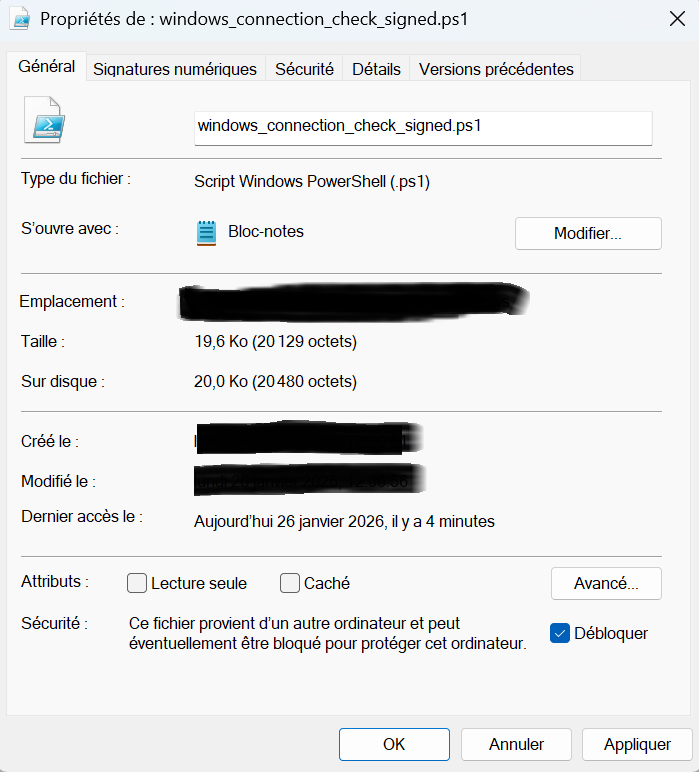
- Right-click the script, click Properties, check the Unblock box to allow the script to run, and click OK.

- Allow PowerShell scripts to run:
Set-ExecutionPolicy -Scope CurrentUser -ExecutionPolicy RemoteSigned# Answer "Yes to All" (A) if prompted
For PowerShell v7.5.4:
There is no need to unblock the script. Run the command shown above.
You’ll be asked if you want to allow the publisher of the script; simply confirm by pressing R or A.


1. Medulla server <-> Medulla relay test
Verify communication between the main server and the relay.
Direction: Server to relay
-
A. On the relay server (Destination): Start listening on the ports. (Do not perform this step if Medulla is already installed or if you are using the SaaS version)
./listen_ports_debian.sh -r -
B. On the Medulla server (Source): Run the connection test.
./medulla_connection_check.sh -r <RELAY_IP>
./medulla_connection_check.sh -r <RELAY_FQDN>
./medulla_connection_check.sh -r <RELAY_SHORT_NAME>
Direction: Relay to server
-
C. On the Medulla server (Destination): Start listening on the ports. (Do not perform this step if Medulla is already installed or if you are using the SaaS version)
./listen_ports_debian.sh -m -
D. On the relay server (Source): Run the connection test.
./medulla_relay_connection_check.sh -m <MEDULLA_IP>
./medulla_relay_connection_check.sh -m <MEDULLA_FQDN>
./medulla_relay_connection_check.sh -m <MEDULLA_SHORT_NAME>
Port 3306 only needs to be taken into account if the relay is a DMZ relay.
2. Medulla server <-> Windows client workstation test
Verify direct communication between the server and client workstations.
Direction: Server to client workstation
-
A. On the client workstation (Destination): Start listening.
.\listen_ports_windows.ps1 -
B. On the Medulla server (Source): Run the test against the workstation’s IP address.
./medulla_connection_check.sh -c client.example.com
Direction: Client workstation to server
-
C. On the Medulla server (Destination): Start listening. (Do not perform this step if Medulla is already installed or if you are using the SaaS version)
./listen_ports_debian.sh -m -
D. On the client workstation (Source): Run the test against the server’s IP address.
.\windows_connection_check_signed.ps1 -Target <SERVER_IP> -Mode pulse
.\windows_connection_check_signed.ps1 -Target <SERVER_FQDN> -Mode pulse
.\windows_connection_check_signed.ps1 -Target <SERVER_SHORT_NAME> -Mode pulse
A log file has been created (in the location where you are running the script) that summarizes several tests, named: LOG_Test_Flux.txt
If you encounter permission errors when creating the log file, try placing the scripts in the user’s Downloads folder, or grant the windows_connection_check.ps1 script permission to create a file in the same location.
3. Medulla relay <-> Windows client workstation test
Only if the workstations need to communicate via a relay.
Direction: Relay to client workstation
-
A. On the client workstation (Destination): Start listening.
.\listen_ports_windows.ps1 -
B. On the relay server (Source): Run the test against the workstation’s IP address.
./medulla_relay_connection_check.sh -c client.example.com
Direction: Client workstation to relay
-
C. On the relay server (Destination): Start listening. (Do not perform this step if Medulla is already installed or if you are using the SaaS version)
./listen_ports_debian.sh -r -
D. On the client workstation (Source): Run the test against the relay’s IP address.
.\windows_connection_check_signed.ps1 -Target <RELAY_IP> -Mode relay
.\windows_connection_check_signed.ps1 -Target <RELAY_FQDN> -Mode relay
.\windows_connection_check_signed.ps1 -Target <RELAY_SHORT_NAME> -Mode relay
A log file has been created (in the location where you are running the script) that summarizes several tests, named: LOG_Test_Flux.txt
If you encounter permission errors when creating the log file, try placing the scripts in the user’s Downloads folder, or grant the windows_connection_check.ps1 script permission to create a file in the same location.
4. Medulla DMZ relay <-> MOBILE Windows client workstation test
Verify direct communication between the server and client workstations.
(Mobile workstations can only be reached on ports 5222 and 22)
Direction: Client workstation to server
-
A. On the DMZ Medulla server (Destination): Start listening. (Do not perform this step if Medulla is already installed or if you are using the SaaS version)
./listen_ports_debian.sh -r -
B. On the MOBILE client workstation (Source): Run the test against the server’s IP address.
.\windows_connection_check_signed.ps1 -Target <SERVER_IP> -Mode relay
.\windows_connection_check_signed.ps1 -Target <SERVER_FQDN> -Mode relay
.\windows_connection_check_signed.ps1 -Target <SERVER_SHORT_NAME> -Mode relay
5. Server intended for Medulla -> your GLPI server test
Verify direct communication between the server and your GLPI server.
(Requires the mariadb-client package: apt install mariadb-client)
-
A. On the Medulla server: Run the test against the external GLPI database.
./check_connection_glpi.sh DB_FQDN DB_USERNAME DB_PASSWORD DB_NAME_GLPI
6. Server intended for Medulla -> your LDAP server test
Verify direct communication between the server and your LDAP server.
(Requires the ldap-utils package: apt install ldap-utils)
-
A. On the Medulla server: Run the test against the external LDAP server.
./check_connection_ldap.sh HOST PORT 'BIND_DN' 'PASSWORD' 'BASE_DN'