
Application Settings - Configuration
The configuration edit form is organized into six tabs:

This page describes the fifth tab, Application Settings, which allows you to define configuration attributes that are pushed directly to the applications installed on the devices.
List of Settings
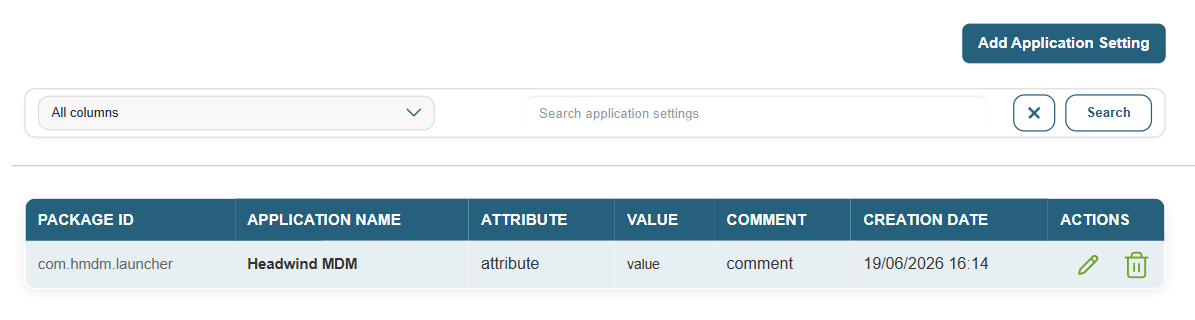
Each row corresponds to a setting associated with an application. The displayed columns are: package ID, application name, attribute, value, an optional comment, and creation date.
A search bar allows you to filter entries by column: package ID, app name, attribute, value, or comment.
Add a setting
The “Add an Application Parameter” button opens a form with the following fields:
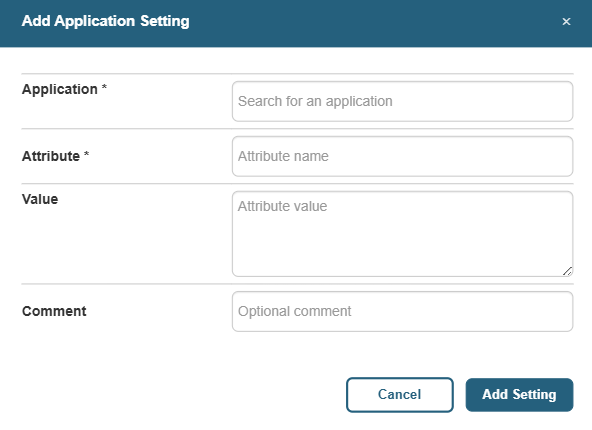
- Application: the name of the relevant application, selected from the applications in the configuration.
- Attribute: Name of the configuration key to be passed to the application.
- Value: the value associated with the attribute. Can contain plain text or a JSON string.
- Comment: a free-form field for documenting the parameter’s use.
Actions
Each entry can be edited or deleted from the list using the corresponding action buttons.