
Upgrading to major OS versions.
The update module in Medulla allows you to perform version updates directly from the Medulla interface via the Major Updates tab:

Clicking the “Major Updates” button takes you to the compliance view, where you can see machines sorted by entity.
For each entity, you’ll see information ranging from Windows 10 versions up to the update from Windows 10 to Windows 11.
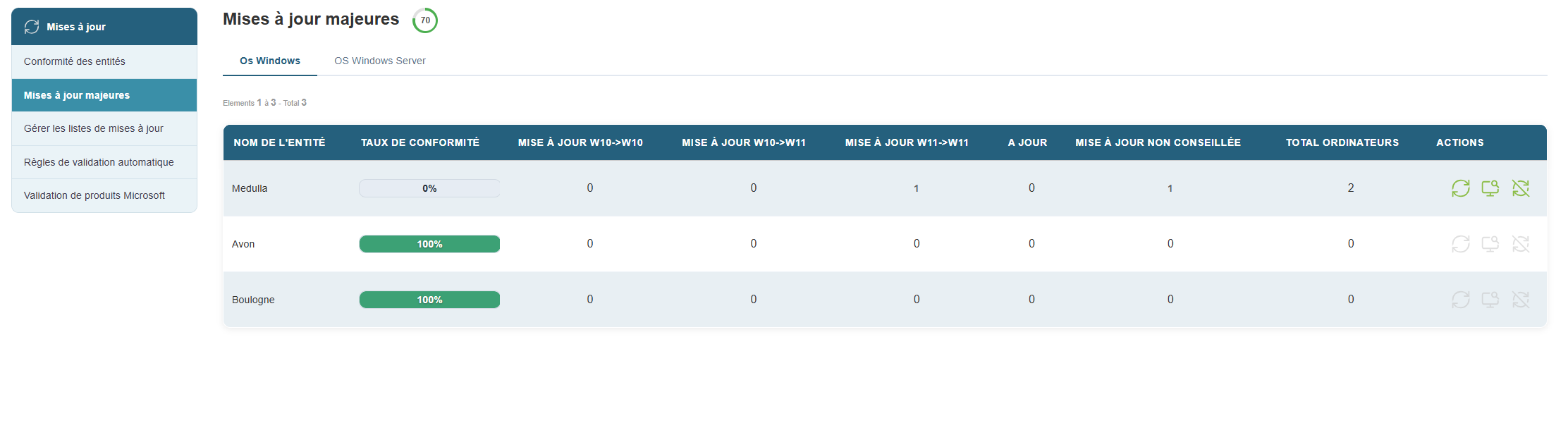
This information includes the number of machines, updates from Windows 10 to Windows 10, and updates from Windows 10 to Windows 11.
Medulla includes Microsoft’s prerequisites for upgrading to Windows 11.
In the image below, we can see that 4 machines do not meet Microsoft’s prerequisites for upgrading to Windows 11.

Among the actions available on this page:
 This icon allows you to perform the deployment of available major updates. If, as shown here, it is grayed out, it means that no machine requires an update or that no machine meets the requirements to receive an update.
 Details per machine within the entity (this provides a history for each machine).
 This action lists the machines that cannot be updated to Windows 11 until the prerequisites are met;
By clicking on the details per machine, you’ll see the following information:
