
Users
This page manages MDM access for Medulla users. Each Medulla user can be granted access to the MDM interface with limited scope: specific devices, specific configurations, or all of them.
This page is accessible only to MDM administrators.
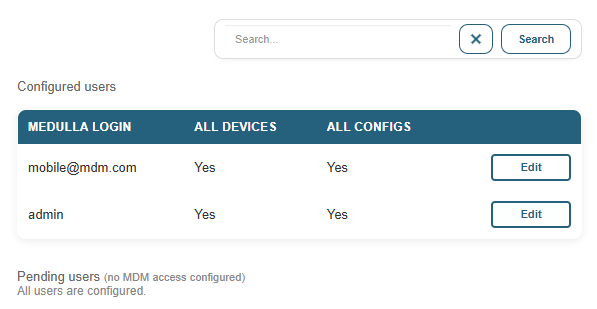
Users are divided into two sections:
- Configured users: users who already have MDM access configured. For each user, the columns indicate whether they have access to all devices and all configurations.
- Pending users: Medulla users who do not yet have configured MDM access. A "Configure" button allows you to grant them access.
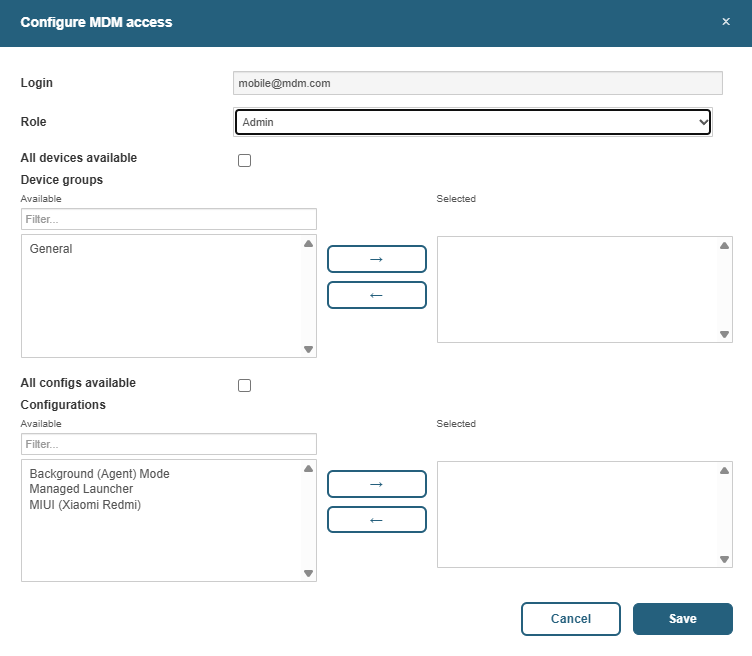
To configure or modify a user’s access, the form offers the following settings:
- Role: The MDM role assigned to the user (e.g., Administrator, User). The role determines the actions the user can perform in the MDM interface.
- Access to all devices: If enabled, the user sees all devices. If disabled, only devices belonging to the selected groups are visible.
- Device groups: Select the groups the user can access (visible only if “Access to all devices” is disabled).
- Access to all configurations: If enabled, the user sees all configurations. If disabled, only the selected configurations are visible.
- Configurations: Select the configurations that are accessible (visible only if “Access to all devices” is disabled).
MDM access is synchronized with Medulla accounts: if a Medulla user is deleted, their MDM account is automatically deleted as well.