
Entity Compliance
Update management is essential for ensuring the security, stability, and consistency of your IT environment. Using the tools provided by the platform, you can precisely identify which entities need updates, track overall compliance, and take targeted, phased, and optimized action.
The Entity Compliance section provides a clear overview of the update status for each set of machines. It allows you to immediately identify entities at risk or requiring action.
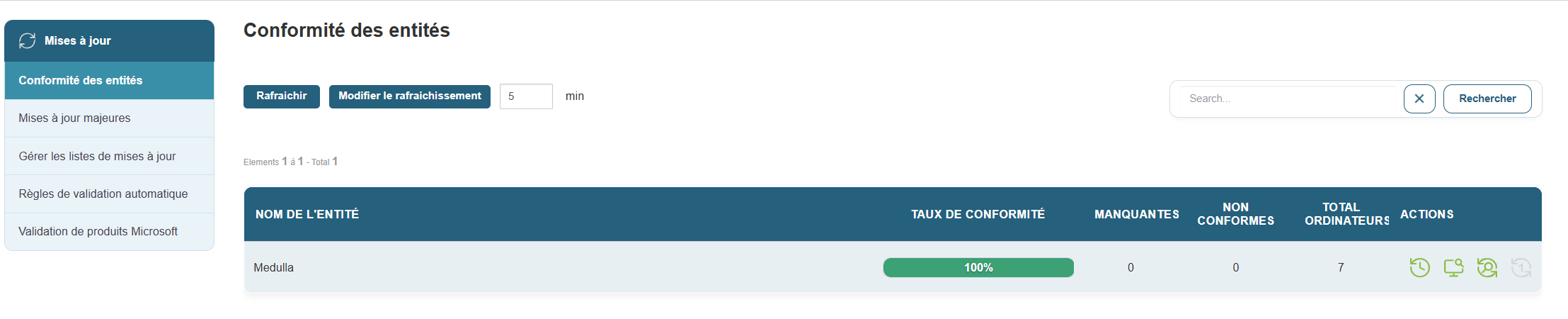
Access:
Table displayed:
-
Entity Name: e.g., Siveo Medulla, Siveo Medulla > Private
-
Compliance Rate: percentage of up-to-date machines
-
Missing Updates: total number of uninstalled patches
-
Non-compliant machines: number of non-standard workstations
-
Total computers: number of machines in the entity
Example:
Available actions:
-
View details: Access the complete list of missing updates, including the affected workstations and the history of deployment attempts
-
Search/filter: by organization name, compliance status, or number of missing Updates
This view is ideal for planning update campaigns, preparing for audits, or measuring the effectiveness of your security policy.
Compliance Tracking
Update compliance is an indicator of your IT infrastructure’s health. The higher it is, the more protected and aligned your systems are.
Best practices:
-
Regularly check entities with a compliance rate below 100%
-
Analyze the causes of non-compliant machines (deployment errors, missed reboots, software conflicts, etc.)
-
Launch a new targeted deployment from the affected entity
Managing updates isn’t just about fixing issues. It’s a proactive, ongoing, and strategic process. With the compliance tools offered by the platform, you can:
-
Quickly view at-risk devices
-
Intelligently deploy the necessary patches
-
Minimize the impact on the network and users
-
Maintain a high level of security across your entire infrastructure