
Choosing the tracked products
Medulla only deals with the products you check. A product that is not checked is neither displayed, nor offered, nor deployed: it is the first setting to make in the module.
The Tracked products screen shows everything Microsoft publishes.
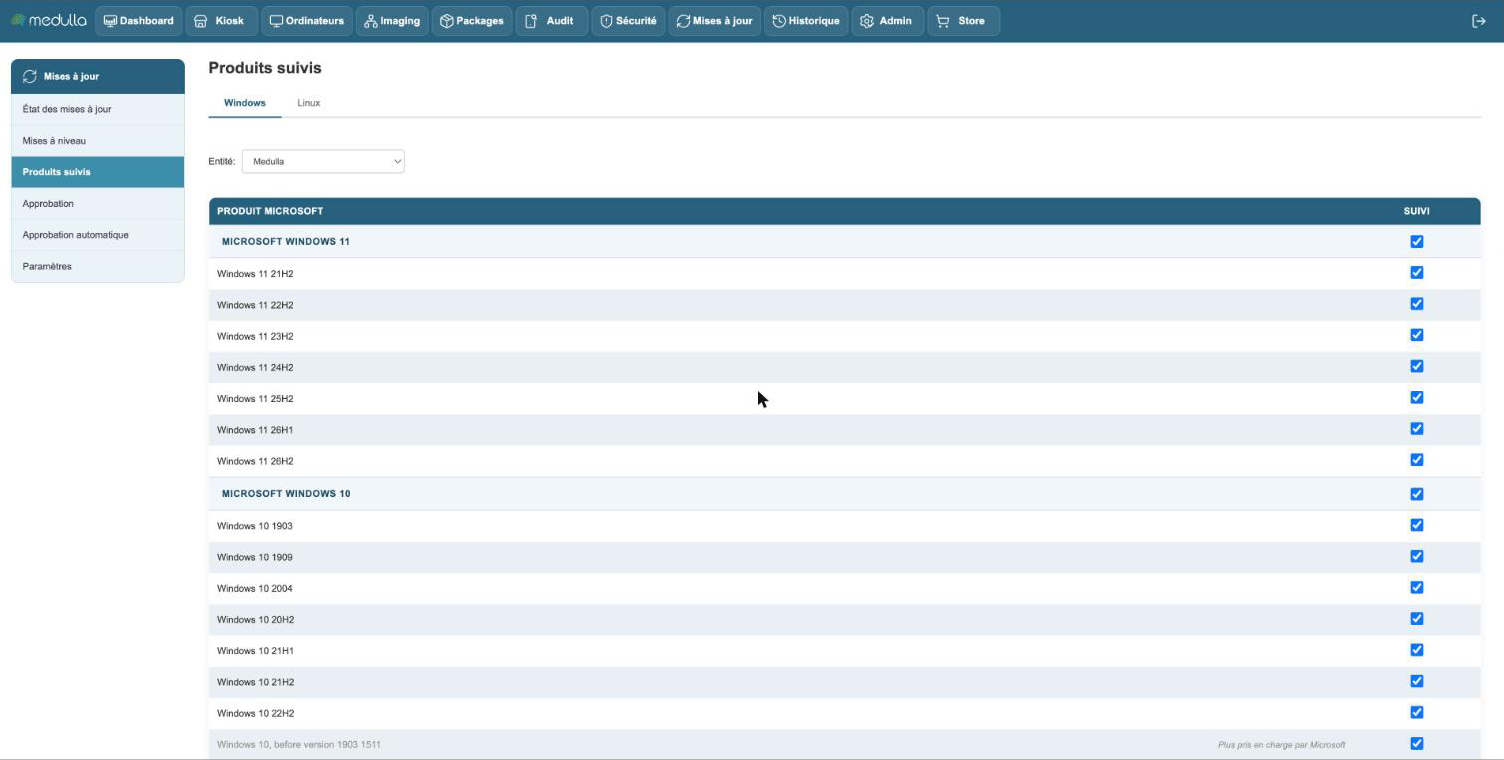
The products are sorted by family: MICROSOFT WINDOWS 11, MICROSOFT WINDOWS 10, MICROSOFT SERVER, MICROSOFT OFFICE, MICROSOFT VISUAL STUDIO and WINDOWS SECURITY.
Checking a product
For Windows, the choice is made version by version: Windows 11 24H2, Windows 11 25H2, Windows 10 22H2. Check the versions actually present in your fleet.
Confirm with Apply. Medulla copies the updates of the product right away and re-evaluates the machines: they appear in the Approval screen a few moments later.
Version not checked: a machine whose Windows version is not checked receives no proposal. It appears in the Not evaluated card of the update status.
Products that are no longer supported
Some rows carry the mention No longer supported by Microsoft. Microsoft no longer publishes fixes for these products; only the old ones remain available. You can check them to bring late machines up to date, but the real answer is to move these machines forward.
Medulla does not sort this list: it displays what Microsoft publishes, you decide what concerns you.
Unchecking a product
Unchecking a product removes it from tracking: its updates disappear from the approval and from the machines, and nothing more is deployed for it. Updates already installed are not touched.
If you check it again later, Medulla copies its updates once more.
Windows Security and Office
Two families behave a little differently from ordinary updates. They have their own page in this chapter:
- Microsoft Defender Antivirus: its definitions are kept up to date without any action on your part.
- Microsoft 365 Apps / Office 2019 / Office LTSC: Office updates itself, Medulla asks it to.
The Linux tab
The Linux tab works on the same principle: you check, for each distribution, the versions you track. This is what determines which version a machine can be upgraded to.
Setting by entity
The Entity selector chooses the entity you are setting. A sub-entity applies the choices of the entity it depends on, as long as it does not have its own. The mention Inherited from then shows which entity the setting comes from. An entity that has its own choices carries the mention Own setting, and the Use the setting of… link returns it to inheritance.