
The update status
This is the home screen of the module. It answers one question: where does my fleet stand?
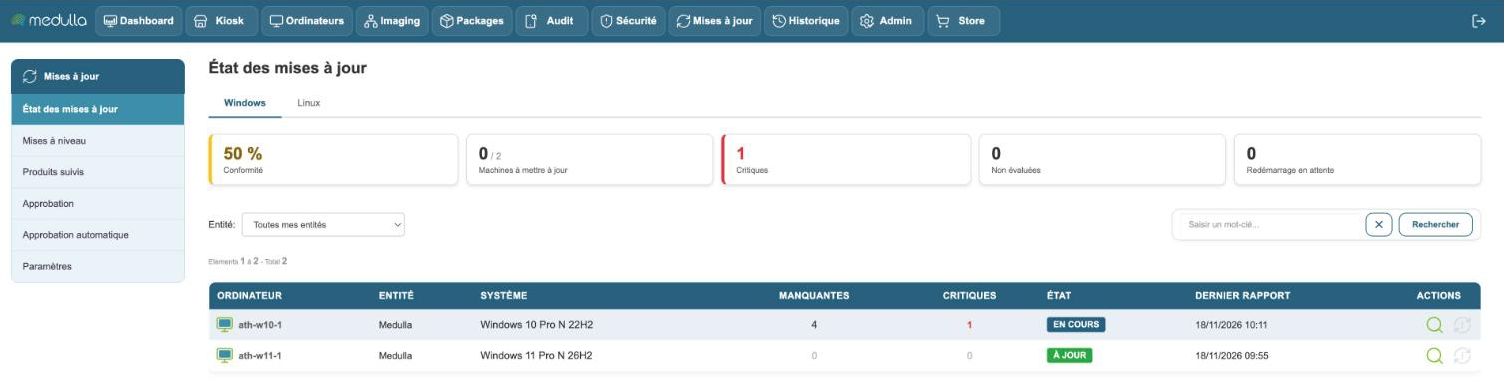
Two tabs separate the systems: Windows and Linux. They read the same way.
The counters
The cards summarize the fleet you are allowed to see.
| Card | What it counts |
|---|---|
| Compliance | the share of machines proven up to date. A machine with no report, or not evaluated, is not counted as up to date |
| Machines to update | the machines that are missing an update and on which nothing is already in progress |
| Critical machines | the machines that are missing at least one critical update |
| Not evaluated | the machines Medulla cannot judge: report more than seven days old, no tracked product in their entity, or Windows version not checked |
| Reboot pending | the machines that must restart to finish an installation |
| No report | the known machines that have never sent a report; the card only appears if there are any |
The figure on the Machines to update, Critical machines and Reboot pending cards is clickable: it creates a group with the machines counted, to act on them all at once from the Computers module.
The list of machines
Each row is a machine.
- System: the installed version, as the machine reports it.
- Missing: the number of updates it is missing.
- Critical updates: those among them that are critical.
- Status: a badge that sums up the situation.
- Last report: the date of the last report received from the machine.
The statuses
| Badge | What it means |
|---|---|
| Up to date | nothing is missing |
| To update | at least one update is missing |
| In progress | a deployment is running on the machine |
| upgrade in progress | the machine is changing version; it stays that way from launch to end |
| Reboot pending | an installation is waiting for the machine to restart |
| Restart requested | you have requested the restart, it has not happened yet |
| Search failed | the machine could not query Windows Update |
| No recent report | the last report is more than seven days old |
| No report received | the machine has never sent a report |
| Out of support | the version is no longer supported by Microsoft |
| Version not tracked | the version of the machine is not checked in the tracked products |
Hover over a badge: a tooltip details the situation when there is something to add.
The figures are up to a day old: a machine sends its report once a day, within half an hour when something changes on it, and right after a Medulla deployment. Look at the Last report column before drawing a conclusion.
Filtering
- The Entity selector limits the list to the machines of the chosen entity.
- On Linux, the Distribution selector limits it to one distribution.
- The search field filters the list.
Acting from the list
The magnifying glass opens the machine page, where you find the detail of what is missing and the deployment actions.
On Linux, a second action deploys all the approved packages of the machine at once.
The restart action is only active for a machine that has a reboot pending.
Acting on a group
In the Computers module, the list of groups offers the action Deploy specific update on this group. It opens the list of updates that the machines of the group are missing.