
Defender and Office
Two Microsoft products are not updated like the others: the product itself goes and fetches its update. Medulla asks it to, then checks the result.
For you, this changes almost nothing: you just have to check the product.
Microsoft Defender
The antivirus definitions
The definitions are the list of threats the antivirus knows. Microsoft publishes them several times a day.
For Medulla to keep them up to date, two settings:
- check Microsoft Defender Antivirus in Tracked products;
- check Definition Updates in Automatic approval.
After that, you have nothing more to do. When a workstation reports that more recent definitions exist, Medulla asks Defender to update itself. The operation takes a few seconds, does not restart the workstation and displays nothing to the user.
It does not depend on the Automatic deployment checkbox or on its time range: the definitions go out at any time.
Where to see it:
- on the workstation page, Products column, Defender line: the version of the definitions, and their date on hover;
- in the history of the workstation: one Windows update KB2267602 row per update. Its log gives the version before and after.
The definitions never appear in the missing updates and do not count as being behind.
Workstation with another antivirus: Defender is inactive there, Medulla launches nothing. The page displays the version followed by the mention "inactive".
The antivirus itself
The antivirus program and the Windows Security application receive a new version from time to time. These appear in the missing updates, and are approved and deployed like any other.
Microsoft Office
Recent Office: Microsoft 365, Office 2019, 2021, 2024
Check Microsoft 365 Apps/Office 2019/Office LTSC in Tracked products.
The page of each workstation that has it then displays, in the Products column, the installed version of Office. If a more recent version exists for this workstation, the mention behind appears, and a row is added to its missing updates.
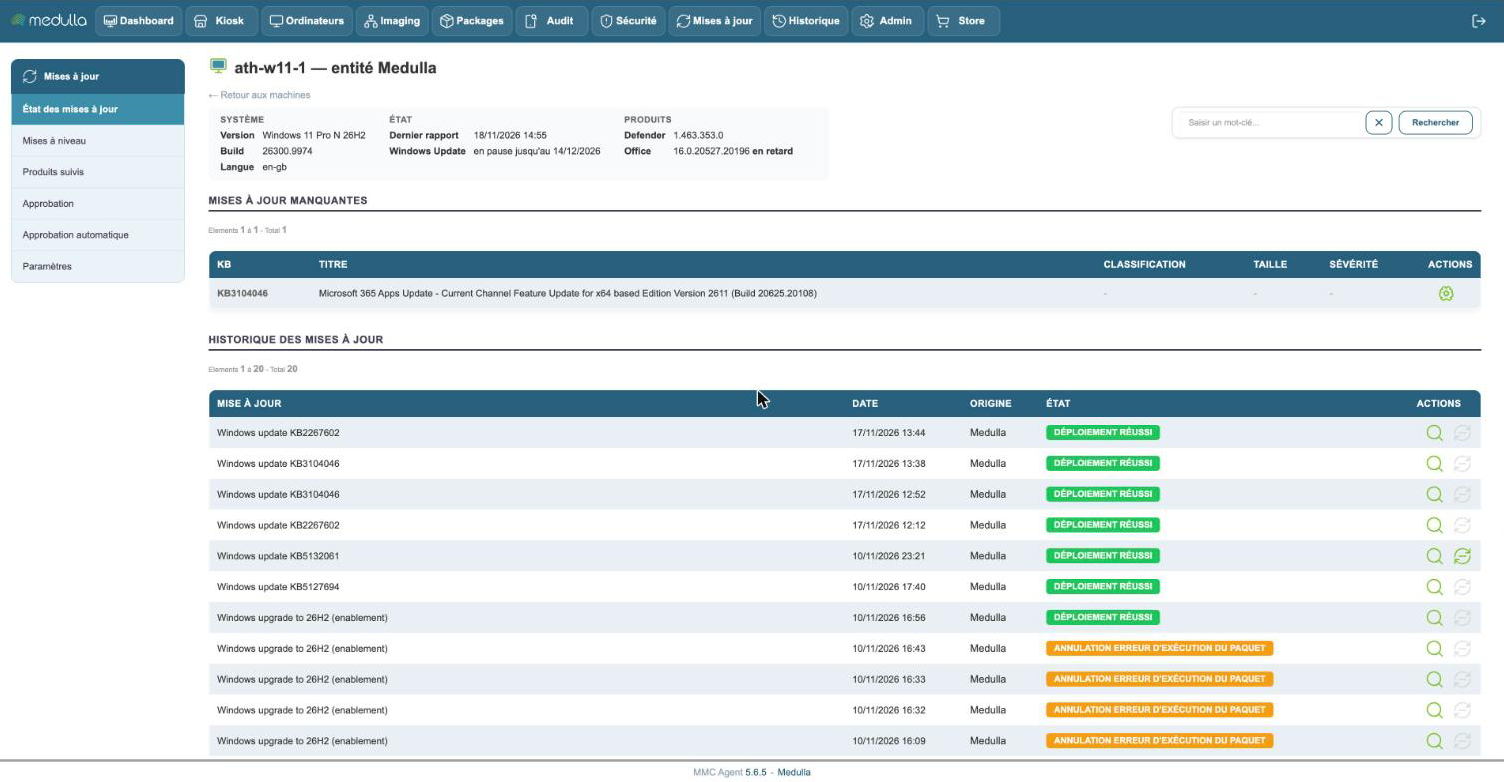
To update Office, click the deployment action of this row and confirm. Office downloads and installs its new version; allow five to ten minutes.
Open applications are never closed. If the user is working in Word or Excel at that moment:
- Office downloads the update without interrupting anything;
- the page displays waiting for Office to close;
- the update is applied by itself a few minutes after the user has closed their Office applications.
You do not have to launch the deployment again: the action is in fact grayed out during this wait.
Office already updates itself: by default, Office installs its updates on its own. Medulla is there to see which workstations are behind, and to trigger the update when you do not want to wait.
Older Office: Office 2016 and earlier versions
These versions receive numbered updates (KB), like Windows. Check the corresponding product in Tracked products.
When the Windows Update of a workstation asks for one of them, it appears in its missing updates. The Install by Windows Update action then asks the workstation to install it itself.
Microsoft no longer publishes new updates for these versions: it is only a matter of bringing late workstations up to date.